How to Get Warm B2B Leads From LinkedIn in 2026
How we turn LinkedIn into warm B2B leads: a list of named buyers, daily comments, repeat touches, when to send the request and what to write after it.

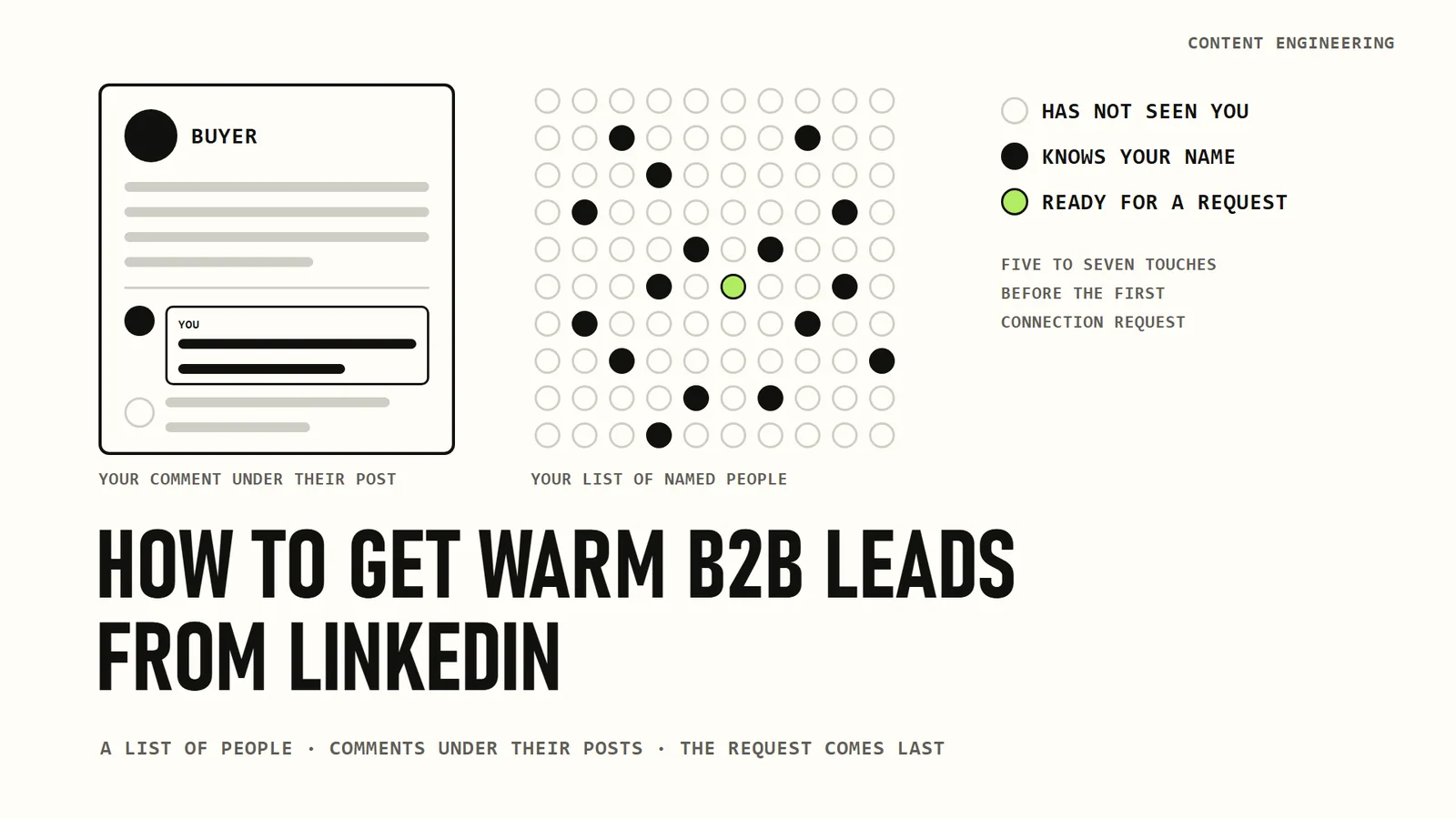
In October our team ran three webinars on one question: how do you get warm B2B leads from LinkedIn? The same team does this work every day, on my account and on our clients' accounts, so the answer was our working routine, with our numbers.
This issue is that routine written down. B2B deals take months, and people rarely buy from a stranger. The classic way around that is a warm introduction from someone who knows you both. Those still happen, but you cannot plan a pipeline around them. So we warm people up ourselves, on LinkedIn, before we ever write to them.
Below I go through the whole loop:
- why a cold connection request and more posts are not enough;
- what to prepare before the first comment;
- how to comment so the right people remember you;
- when to send the connection request and what to write after it;
- what this gave my account in 90 days, and how we run it.
In this article
- Why cold requests and more posts are not enough
- Before the first comment: your profile and your list
- Comment where your buyers already are
- Your own posts and the first hour
- Catch the signals and go back
- Send the request within a day of your last comment
- What to write after they accept
- What this gave my account
- How we run it
- Where this leaves you
Why cold requests and more posts are not enough
A connection request from a stranger is easy to ignore. In one large industry dataset, 13.2 million requests sent through an outreach tool between May 2025 and April 2026, about 28% were accepted (industry data, not LinkedIn's). In our accounts, when the person has seen our name several times before the request arrives, about half accept.
Posting more does not fix this. Anyone can now produce a post a day with AI, and the feed is full of them. The people you want to reach do not follow you yet, so most of your posts never reach them. LinkedIn first shows a new post to a small group and spreads it further only if people react in the first hour.
What still works is being visible where your buyers already spend time. They read the comments under their own posts. That is where the loop starts.
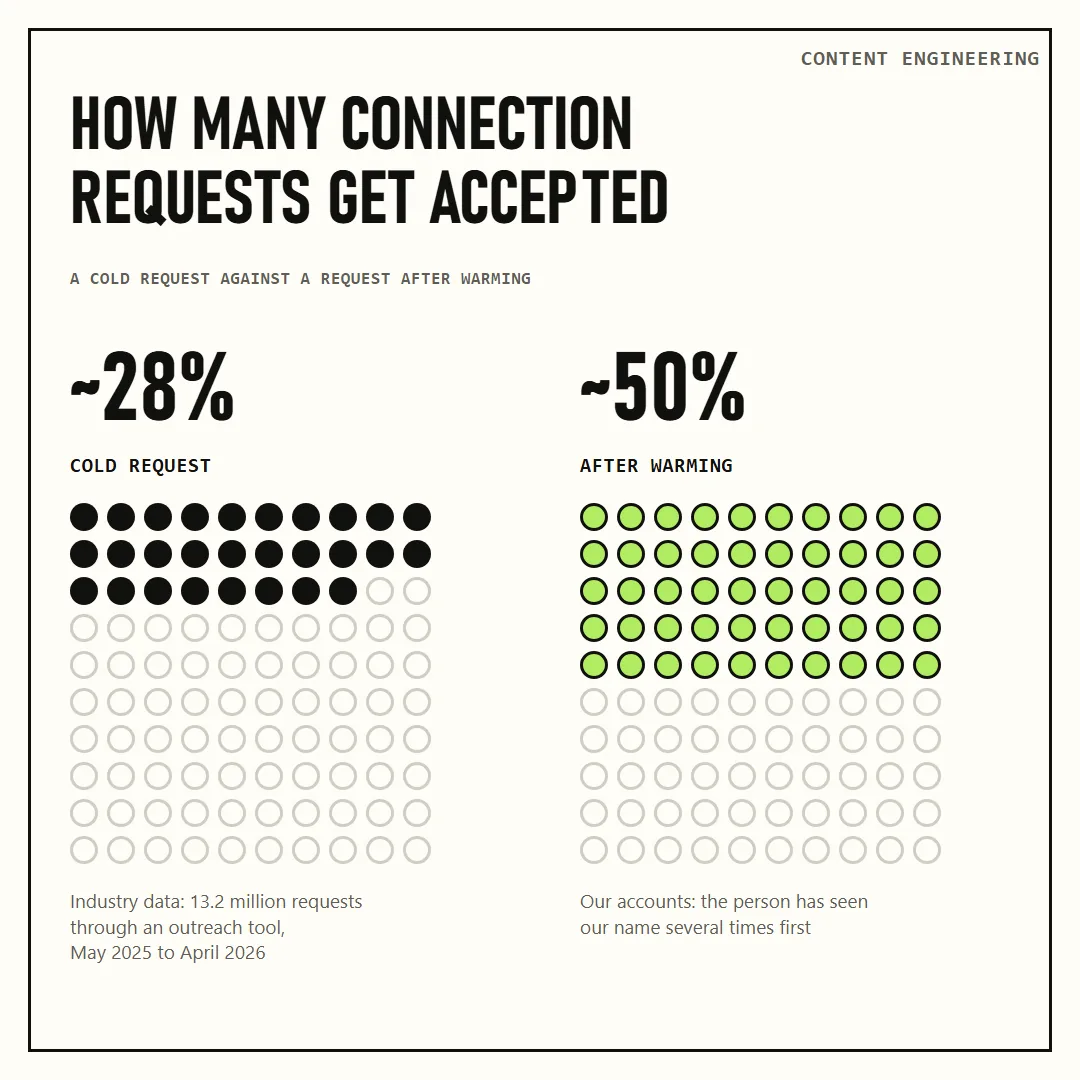
Industry average for connection requests against our accounts after warming.
Before the first comment: your profile and your list
Your profile is the landing page
Everyone you comment on will click your name at least once. So treat the profile like a landing page: it has to say who you are, what you do and how to start a conversation with you.
On my profile you see the services we offer, a few featured posts and a button to book a call. Our checklist for clients is short: a banner, a visible call to action button, and filled out About, Featured, Services and Recommendations sections. Reviews on independent review sites in your category help as well.
The profile now has a second kind of reader. A March 2026 Semrush study, done together with LinkedIn, ran 325,000 prompts through ChatGPT Search, Google AI Mode and Perplexity. LinkedIn was the second most cited domain in all three. In ChatGPT Search and Google AI Mode, 59% of the LinkedIn citations pointed to individual members rather than company pages.
You do not need a big audience to be cited. Only about half of the cited post authors had more than 2,000 followers, and the median cited post had 15 to 25 reactions and at most one comment (industry data).
A list of people, not companies
Most founders arrive with a list of target companies. Break each company down to the people who make the decision, such as the founder, the CMO, the head of sales or the head of product, and put their LinkedIn profiles in one list. We call it the ICP list, from ideal customer profile.
Our working lists hold 1,000 to 3,000 profiles, usually built in LinkedIn Sales Navigator or with a data service. If you are starting by hand, a few hundred names you would want on a call is enough, as I wrote in the issue about reachable buyers.
Not everyone on the list uses LinkedIn. Usually 10% to 40% of a list is active, meaning they post now and then, react and comment (our own data). Those are the people you work with.
Read them before you write
Before you publish anything for these people, read them. What do they post about, what questions do they ask, whose posts do they react to, which words do they use for their problems?
Then use their words in your own posts. You are writing for them, so the post has to sound like their world. LinkedIn search and AI answers also run on these words.
Comment where your buyers already are
This is the part that takes the most work, and it matters more than your own posts. Your buyers do not follow you yet, so they do not see what you publish. They do see every comment under their own posts.
Three kinds of comments work:
- Practical. What you did in the same situation and how it went.
- Insightful. A number, a detail or an angle the author did not have.
- A question about their post. This one works best for us. The author answers, the thread keeps going, and other readers follow it.
"Great post" and "congratulations" do nothing. A single comment does little too. Our rule of thumb is about five comments and ten likes before a person starts to recognize your name.
Comments travel further than most people expect. One of the CMOs we want to reach left a comment under one of my posts. That comment alone reached almost 7,000 impressions and led to profile visits.
So this has to be daily. On my account the morning starts with 10 to 20 new posts from people on the list, and the replies I owe under my own posts.
Your own posts and the first hour
Your own posts still matter, for a different reason. Once your buyers know your name, they look at what you publish.
LinkedIn shows a new post to a small group first and spreads it further if people comment in the first hour. Ask colleagues, partners and clients to comment early if they have something to say, and answer every comment quickly, because your replies count as activity too.
Keep it to real people who want to help. A chat where everyone is told to like every post is what LinkedIn calls an engagement pod, and its rules do not allow it. I wrote about setting this up properly in the issue about team support.
Write for your list, in their words. One of my posts got about 167 comments, most of them from people on our target list.
Catch the signals and go back
After some time of this, people start coming back. They like your post, answer your comment, visit your profile, or like your comment under someone else's post. Each of these is a signal, and a signal goes cold in days.
Write the signals down. Drop the people who are not on your list, and keep working the rest: when they publish next, comment again. It usually takes five to seven touches before someone knows who you are.
Everyone who reacts goes back into the loop, so the work never finishes. We call it the warm loop.
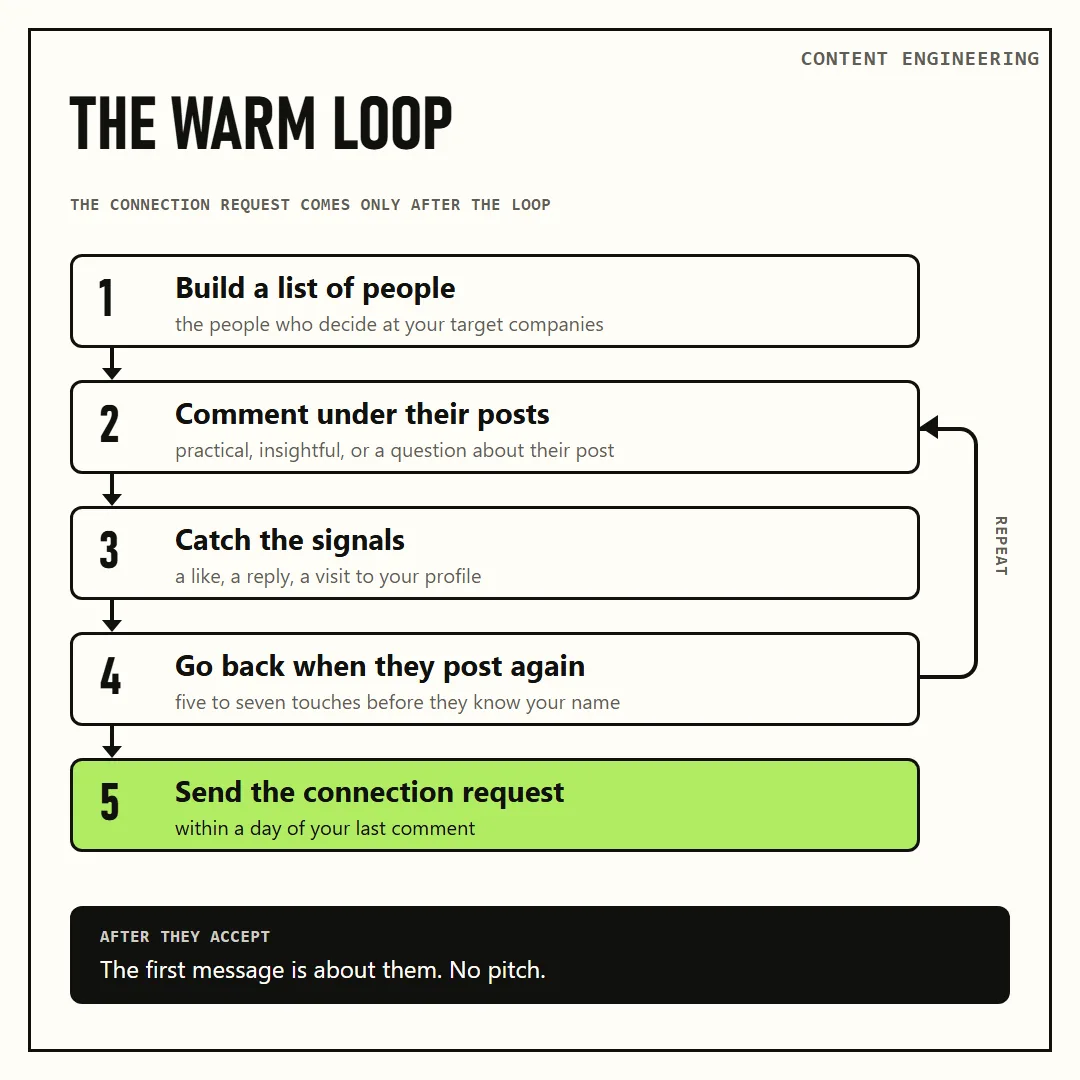
List, comments, signals, repeat touches. The connection request comes only after the loop.
In our tool every contact has a warmth level: hot, warm or cold. It is calculated from all touches in both directions, including profile visits, and it drops when a person goes quiet.
Send the request within a day of your last comment
When someone is warm, send the connection request within one day of your last comment, while they still remember your name. This timing is how we get about half of our requests accepted.
Skip the long note. A short line such as "thanks for connecting" is enough, and the real message comes after they accept.
What to write after they accept
The first message has one rule: it is about them. Nothing about you or your company, and no pitch. Write as a peer from the same industry. The only goal of the first message is that the person keeps talking.
Five openers that work for us:
- Curiosity. "I'm curious what you're building. Here's what I'm working on." Then suggest a coffee chat.
- Their post plus your experience. Thank them for a post, or for their comment under yours, and add what you know on the topic. A direct message gives you more room than a comment.
- A request for feedback or advice. Show a draft, a list or a tool and ask what they think. People like giving advice. In our own outreach this one gets the best response.
- The thread you already had. Pick up exactly where your comments under their post ended.
- A real event plus a question. For a new role or a funding round, skip the congratulations and ask about the work, for example how they are building pipeline now.
If there is no reply, follow up after two to five days with something new. Once the conversation is going, offer a short call: "I can show you what we do. Do you have 20 minutes next week?"
What this gave my account
Our team runs this loop on my account (our own data). In the 90 days before the October webinar we left about 262 comments and more than 450 reactions on posts by people from our list. What came back was about 2,000 reactions and 438 comments.
About 258 people from the list now engage with me regularly, and I with them. About 400 people from the original list came to my profile. In September this gave us about 22 warm conversations.
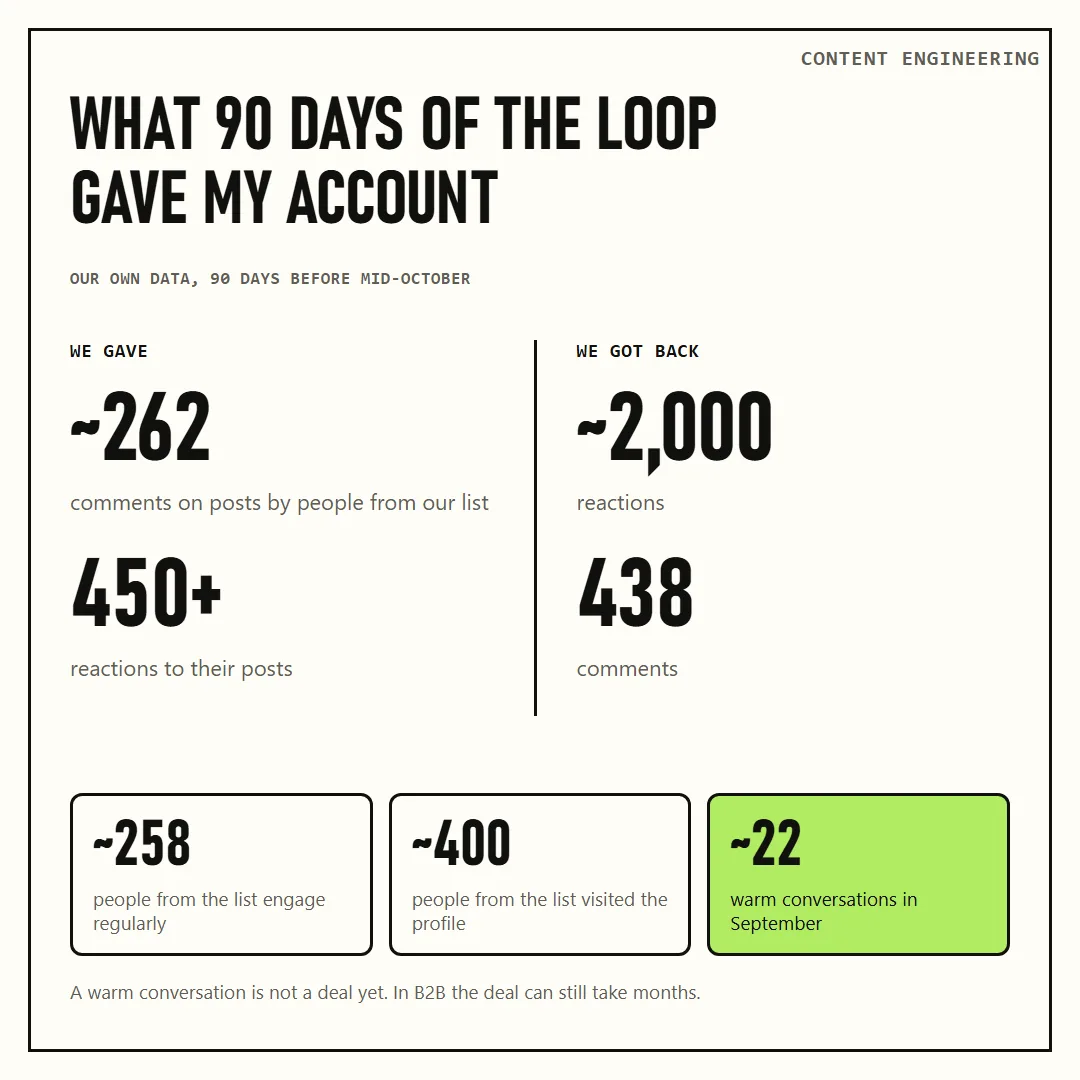
Our own data, my account, 90 days before mid-October.
A newer example is a client we had just started with. In the first week we left 94 comments on posts by people from his list before sending a single request. Then 50% of his connection requests were accepted, and five people from the list wrote to him first, before we sent any message.
Two honest notes. These numbers come from accounts where someone works the loop every day, so they are not a forecast for yours. And a warm conversation is not a deal yet. In B2B the deal can still take months.
How we run it
We built part of our product, co.actor, around this loop, and we sell it, so factor that in.
The day starts in the engagement queue. It shows posts only from people on your list, each with a short summary and three comment drafts in your voice. You pick one, change what you want and send it, or leave a reaction instead. The system learns from your edits, and nothing goes out without your click.
The network hub works like a CRM, a database of contacts: who engaged with you, who you engaged with and how warm each person is, filtered by period, country, seniority and list. From there you select warm people and draft first messages from your goal and your rules, for example "no pitching, networking only". You edit the drafts and send them by hand or export them to your outreach tool.
Clients either run the whole loop themselves in co.actor, or we run it for them end to end.
Where this leaves you
Warm leads on LinkedIn come from a routine you can start tomorrow: a list of named people, comments under their posts, repeat touches, a request while they still remember you and a first message about them. Your own posts help, but they come second.
The connection request is the last step. By the time you send it, the person should already know your name.
If you want to see this loop on your own list, write to me at linkedin.com/in/sbulaev or through cccrafts.ai.
Content Engineering is a newsletter by cccrafts. We build and run content systems for B2B companies.
Serge Bulaev is the CEO and founder of cccrafts, where the team builds and runs content systems for B2B companies. He writes Content Engineering, a newsletter about the data, automations and costs behind content that reaches the right buyers.